
Our Picks

Anker Prime 26,250mAh (300W)

Anker Laptop Power Bank (25K, 165W)

EcoFlow RAPID Pro

UGREEN Nexode 200W 25000mAh
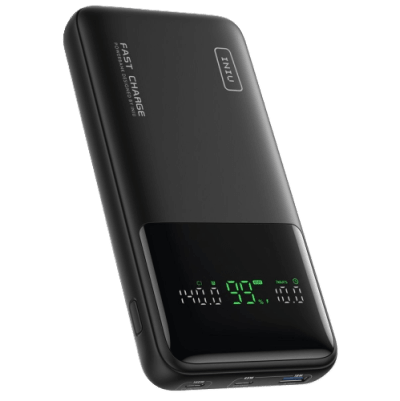
INIU B64 PowerNova
Introduction
Two years ago, charging a laptop from a portable battery meant watching the "Not Charging" icon blink while your MacBook drained faster than the power bank could feed it. A 45W trickle through a standard USB-C cable barely kept a word processor alive, let alone a code editor with 30 Chrome tabs in the background. The technology simply was not there.
That changed with PD 3.1. The USB Power Delivery 3.1 specification introduced Extended Power Range (EPR), which allows a single USB-C port to push up to 140 watts at 28 volts. To put that in context, 140W is the exact wattage Apple ships with the 16-inch MacBook Pro wall charger. A portable power bank can now match your wall outlet, and the best ones do it while staying under the FAA's strict 100 watt-hour flight limit.
But there is a wide gap between a marketing spec sheet and a power bank that actually delivers 140W for more than five minutes before overheating. Thermal throttling, cheap internal cell chemistry, and misleading "total wattage" numbers plague the budget end of this market. This guide focuses on the five laptop power banks that hold their rated output under sustained load, charge themselves quickly, and survive a TSA checkpoint without getting confiscated.
What to Know Before Buying a Laptop Power Bank
The 100Wh Airline Limit Is Non-Negotiable
The FAA caps carry-on lithium-ion batteries at 100 watt-hours. Cross that line, and security will confiscate it at the gate. This is why every serious laptop power bank targets a capacity between 90Wh and 99.9Wh. Ignore the cheap 40,000mAh bricks on Amazon that sound impressive. Most of them blow past the 100Wh ceiling and cannot legally board a commercial flight.
Watch Out for the Thermal Throttling Trap
Here is the dirty secret of high-wattage power banks: stepping up battery voltage from 3.7V internally to the 28V required for 140W EPR output generates serious heat. Some models handle this well. Others do not. The CUKTECH 20, for example, advertises 130W output but drops to 60W within 22 minutes of heavy use as the surface temperature climbs past 60°C. Entire Reddit threads on r/UsbCHardware document its boot-looping failures under load. Look for power banks with active thermal management (thermal gel, graphite film, temperature monitoring) rather than just a wattage number on the box.
Your Cable Matters More Than You Think
This is the single biggest mistake new buyers make. A standard USB-C cable is only rated for 60W or 100W. To hit the full 140W EPR speed, you need a 240W-rated cable with an internal E-Marker chip. That chip tells your power bank and laptop that the cable can safely handle 5 amps at 28 volts. Without it, your $200 power bank will silently cap itself at 60W. The INIU B64, for instance, ships with a 60W cable in the box, so buyers who skip the cable upgrade never see its full potential.
Self-Recharge Speed Determines Your Workflow
A 25,000mAh power bank holds a massive amount of energy. If it only accepts 65W input, refilling it takes over two hours. That is fine if you charge overnight. It is a dealbreaker if you have a 90-minute airport layover and need a full tank. Models like the Anker Prime (250W dual input) and the EcoFlow RAPID Pro (80% in 20 minutes with its dock) are designed for people who need fast turnaround between uses.
Anker Prime 26,250mAh (300W) - The Gold Standard for Laptop Charging

Anker Prime 26,250mAh (300W)
Pros
- Maxes out the 100Wh airline limit at 99.75Wh
- Two independent 140W USB-C ports charge two laptops at once
- ActiveShield 4.0 runs millions of temperature checks to prevent throttling
- Bluetooth app tracks cell health, temperature, and per-port wattage in real time
Cons
- 645g makes it the heaviest option in this category
- The pogo-pin charging base is a separate $30 purchase
The Anker Prime 26K (Model A110A) is the most technically complete laptop power bank available right now. Its 99.75Wh capacity hits the FAA's flight ceiling with surgical precision, packing every legal milliamp-hour into a battery roughly the size of a thick paperback novel. But capacity alone is not what puts it at the top of this list.
Sustained 140W Output Without Throttling
What sets the Prime apart is sustained output under load. Both USB-C ports are rated for 140W PD 3.1 EPR individually, and independent testing confirms the power bank can hold 140W to a single device for 30+ minutes without thermal throttling. The internal thermal architecture uses thermal gel, graphite film, and Anker's ActiveShield 4.0 system, which runs continuous temperature checks and adjusts output dynamically rather than hard-cutting power when things get warm.
A Truly Useful Smart Screen and Bluetooth Control
The color TFT display is genuinely useful, not a gimmick. It shows per-port wattage, remaining percentage, and internal temperature at a glance. Pair it with the Anker app over Bluetooth and you get granular control: cell health monitoring, charging profile switching (Smart Mode vs. Power Saving), and a device locator if you leave it behind. This level of software integration is unusual in the power bank market and speaks to Anker's push into the premium tier.
Rapid Dual-Port Self-Recharging
Recharging the Prime is fast. With dual USB-C inputs accepting 250W total, a dead unit reaches full in about 40 minutes. In practice, single-port 140W charging is slightly more thermally efficient and adds maybe 10 extra minutes, but the total time is still well under an hour.
The Weight and Price Tradeoffs
The downside is weight. At 645 grams, this is not something you forget is in your bag. And the optional pogo-pin charging base, which makes the recharging experience even smoother, is a separate $30 purchase that probably should have been included at the $189 price point.
Anker Laptop Power Bank (25K, 165W) - Kill the Cable Clutter

Anker Laptop Power Bank (25K, 165W)
Pros
- Built-in retractable USB-C cable means you never need to pack a separate laptop cable
- Carrying strap doubles as a second USB-C cable for charging a phone simultaneously
- Under $100, making it the most affordable high-capacity option from a major brand
- Smart screen displays battery percentage, port output, and internal temperature
Cons
- Main port maxes out at 100W PD 3.0, so it will not fast-charge 16-inch laptops at full speed
- If the retractable cable mechanism breaks, that port is permanently lost
If you have ever pulled a power bank out of your backpack only to spend two minutes untangling the USB-C cable from your headphone cord, the Anker A1695 exists specifically for you. It has a built-in retractable USB-C cable that extends to about two feet and locks into place, then retracts with a click when you are done. A second, shorter cable runs along the carrying strap, letting you charge a phone off the same unit without any extra accessories.
TSA Compliance and 100W Power Delivery
The 25,000mAh (90Wh) capacity keeps it well under the 100Wh TSA ceiling, and the 100W maximum single-port output is enough to charge a 14-inch MacBook Air or most Windows ultrabooks at full speed. It will charge a 16-inch MacBook Pro too, just not at the maximum rate. The machine will still gain charge while in use, which is what matters for a working flight.
Zero-Cable Daily Carry Experience
Where the A1695 beats its competitors is in the daily carry experience. At 595 grams and $99, it is lighter and cheaper than every other option in this roundup. The smart screen shows battery percentage, active output wattage, and internal temperature. There are no dongles to lose, no cables to pack, and no accessories to buy separately.
Long-Term Durability Concerns
The risk with built-in cables is mechanical failure. If the retractable mechanism wears out or the cable itself gets damaged, that port is gone. There is no user-serviceable replacement. Treat it carefully and avoid yanking the cable at sharp angles, and it should hold up for years. But if you routinely abuse your gear, a traditional power bank with a separate cable might be a safer bet.
EcoFlow RAPID Pro - A Portable Power Station in Your Pocket

EcoFlow RAPID Pro
Pros
- 300W total output with a built-in retractable 140W EPR cable for instant deployment
- Magnetic modular accessory system adds Qi2 wireless charging or Apple Watch charger
- 80% recharge in 20 minutes when paired with the 320W desktop dock
- Dynamic power allocation automatically prioritizes the highest-draw device
Cons
- At $299, it costs more than most laptop wall chargers
- Active Wi-Fi and Bluetooth drain battery during storage if not powered off manually
EcoFlow made its name building solar-powered power stations for RVs and off-grid cabins. The RAPID Pro takes that same engineering philosophy and compresses it into a form factor that fits in a jacket pocket. At 27,650mAh (99.54Wh), it sits just under the flight limit, and its 300W total output matches the Anker Prime for raw power.
Clever Modular Magnetic Ecosystem
The standout feature is the modular magnetic accessory system. The back of the RAPID Pro has magnetic attachment points that accept optional accessories: a Qi2 wireless charging pad, an Apple Watch charger, or additional cable ports. This turns a standard power bank into a multi-device charging hub that you can customize to your specific gear loadout. A photographer might snap on a USB-A adapter for memory card readers. A developer might add a second USB-C cable mount. The modularity is genuinely clever and has no real competitor.
Extreme Recharge Speeds
Recharge speed is where the RAPID Pro dominates. Its dedicated 320W desktop charging dock fills the battery to 80% in 20 minutes. No other consumer power bank on the market comes close to that turnaround time. The catch is that the dock itself is an additional purchase, and using a standard USB-C wall charger brings the recharge time back to a more typical 90 minutes.
Active Radio Battery Drain
One real-world quirk worth noting: the RAPID Pro has active Wi-Fi and Bluetooth connectivity for its app and smart features. These radios consume a small amount of power even when the unit is not actively charging a device. Left on a shelf for a few days, it will lose noticeable battery. Get into the habit of fully powering it down through the settings menu or the app when you are done using it. It is not a "set it and forget it" battery.
A Very Premium Price Tag
At $299, this is the most expensive power bank in this roundup by a wide margin. That price only makes sense if you burn through multiple devices in a single workday and need the 20-minute dock recharge to stay productive. For everyone else, the Anker Prime delivers similar output for $110 less.
UGREEN Nexode 200W 25000mAh - The Dual-Laptop Workhorse

UGREEN Nexode 200W 25000mAh
Pros
- Sustains 100W + 100W across both USB-C ports simultaneously without dropping output
- Automotive-grade 21700 lithium cells provide 800+ charge cycles before capacity loss
- High-contrast TFT display shows real-time wattage per port, not just a battery icon
- TSA-compliant at 90Wh with a thick aluminum chassis that doubles as a passive heat sink
Cons
- Self-recharge is capped at 65W input, so refilling takes about 2.5 hours
- Adding a third device via USB-A drops the secondary USB-C port to 20W
Most high-capacity power banks have a dirty secret in their spec sheet. They advertise dual USB-C ports with impressive individual ratings, but plug in two devices at once and the secondary port drops to a trickle. The UGREEN Nexode 200W is one of the few that does not play this game. Both USB-C ports sustain a genuine 100W output simultaneously, confirmed by reviewers using USB power meters under load.
Automotive-Grade Internal Build Quality
The internal build quality supports this claim. UGREEN uses 21700 lithium cells, the same cylindrical format used in electric vehicle battery packs. These cells offer higher energy density and a longer cycle life than the cheaper 18650 cells found in most budget power banks. UGREEN rates this unit for 800+ charge cycles before the capacity drops below 80%, which translates to years of daily use before you notice any degradation.
Granular Power Metrics
The TFT display is one of the better implementations in this class. It shows real-time wattage for each active port, remaining percentage, estimated time to empty, and input vs. output status. You can verify at a glance that both of your laptops are getting the 100W they need, rather than guessing based on a blinking LED.
A Slow Self-Recharge Bottleneck
The big tradeoff is self-recharge speed. Input is capped at 65W, which means filling the 25,000mAh battery from empty takes about two and a half hours. For context, the Anker Prime fills in 40 minutes. If you need fast turnaround between uses, this is a problem. If you charge overnight or during a long dinner, it does not matter at all.
Dynamic Power Shifting
Worth noting: when all three ports are active (two USB-C and one USB-A), the power distribution shifts. The primary USB-C port holds at 140W, but the secondary USB-C port drops to 20W to accommodate the third device. Stick to two ports if you need full dual-laptop output.
INIU B64 PowerNova - Full 140W Output for Under $80

INIU B64 PowerNova
Pros
- Full 140W PD 3.1 output and 99.9Wh capacity for under $80
- 100W input recharges the entire unit in about 1.8 hours
- Flat, wide form factor slides into a laptop sleeve without adding bulk
- LED display in 'pro mode' shows per-port wattage and remaining runtime
Cons
- Rubberized plastic shell is a fingerprint magnet and scratches easily
- The box cable only supports 60W, so a separate 240W EPR cable is required for full 140W output
The INIU B64 PowerNova answers a question that dominated Reddit's r/UsbCHardware community for most of 2025: does a budget power bank exist that actually delivers 140W PD 3.1 output to a laptop? The answer, with a caveat, is yes.
High Capacity at half the Price
At $79, the PowerNova costs less than half the Anker Prime and delivers the same 140W from its primary USB-C port. The 27,000mAh (99.9Wh) capacity is the highest in this roundup, sitting right at the legal flight ceiling. It charges a 16-inch MacBook Pro from flat to about 59% in 30 minutes, which is identical to what you would get from a wall charger at the same wattage.
The 60W Included Cable Gotcha
The caveat is the cable. INIU includes a USB-C cable in the box that is only rated for 60W. If you plug in your laptop with the included cable, the power bank will silently limit its output to 60W because the cable's E-Marker chip reports a lower rating. You need to buy a separate 240W EPR-rated cable (about $12 on Amazon) to unlock the full 140W speed. This is a cost-cutting decision that trips up a lot of first-time buyers, and INIU's packaging does not make it obvious.
Secret 'Pro Mode' Telemetry
Once you have the right cable, the performance is solid. The LED display has a hidden "pro mode" (hold the power button for three seconds) that switches from a simple percentage readout to per-port wattage, input/output status, and estimated runtime. The 100W input recharges the full battery in about 1.8 hours, which is competitive with models costing twice as much.
Clear Plastic Compromises
Build quality is the main compromise. The rubberized plastic shell attracts fingerprints like a mirror and picks up minor scratches quickly. It feels noticeably cheaper in hand compared to the aluminum-and-glass construction of the Anker Prime or EcoFlow RAPID Pro. But if your priority is raw watts per dollar, no other power bank in this guide comes close.
How to Calculate Your Laptop's Actual Runtime on a Power Bank
Most buyers look at a power bank's milliamp-hour number and assume bigger is better. That number matters, but it only tells half the story. The other half is how many watts your laptop actually pulls during the kind of work you do.
Step 1: Find Your Real Power Draw
Open Activity Monitor on a Mac or Task Manager on Windows and watch the power consumption graph. A 14-inch MacBook Pro running a browser and a text editor draws about 8 to 12 watts. The same machine compiling a large codebase or rendering 4K video spikes to 70 to 95 watts. The difference between those two scenarios means the difference between five hours of battery life from a power bank or barely one hour.
Step 2: The Runtime Formula
Here is the math: (Power Bank Capacity in Wh × 0.85) ÷ Average Laptop Draw in Watts = Hours of Runtime
The 0.85 factor accounts for energy lost as heat during voltage conversion. For example, the Anker Prime (99.75Wh) powering a laptop at 15W average draw:
(99.75 × 0.85) ÷ 15 = 5.6 hours of office work
The same battery with a laptop pulling 70W during a video export:
(99.75 × 0.85) ÷ 70 = 1.2 hours of heavy workload
Step 3: Match Your Power Bank to Your Work
If you mostly write documents, browse the web, and answer emails, any power bank in this guide will last an entire workday. If you run processor-heavy workflows like video rendering, CAD, or local AI model training, prioritize fast self-recharge speed over raw capacity. You will burn through the battery quickly regardless, so the ability to refill in 20 to 40 minutes matters more than an extra 10Wh of capacity.
Conclusion
The laptop power bank market in 2026 splits cleanly into two tiers. At the top, the Anker Prime 26K (300W) and the EcoFlow RAPID Pro deliver true 140W EPR output, sub-hour recharging, and advanced thermal management. They are expensive, but they genuinely replace a wall charger for hours at a time. The Prime is the better buy for most people, offering 95% of the RAPID Pro's performance at $110 less.
For travelers, the Anker A1695 with its built-in retractable cable eliminates cable clutter entirely at a $99 price point. For dual-laptop setups, the UGREEN Nexode 200W is the only model in this group that sustains 100W on both ports without cutting power to either device. And for anyone on a tight budget, the INIU B64 PowerNova delivers 140W PD 3.1 output for $79, as long as you buy the right cable alongside it.
All five models in this guide stay under the FAA's 100Wh flight limit. All of them support USB-C PD fast charging. The right one depends on how you work, where you travel, and how much you are willing to spend. Pick the one that matches your workflow, buy a proper 240W EPR cable if your model does not include one, and stop worrying about finding a wall outlet.
FAQ
Product Comparison at a Glance
| Product | Brand | Capacity | PD 3.1 Port | Max Output | Weight | Best For | Action |
|---|---|---|---|---|---|---|---|
#1Anker Prime 26,250mAh (300W) | Anker | 26,250mAh (99.75Wh) | 140W (PD 3.1) | 300W | 645g | Most Laptop Users | |
#2Anker Laptop Power Bank (25K, 165W) | Anker | 25,000mAh (90Wh) | 100W (PD 3.0) | 165W | 595g | Frequent Travelers | |
#3EcoFlow RAPID Pro | EcoFlow | 27,650mAh (99.54Wh) | 140W (PD 3.1) | 300W | 699g | Off-Grid Power Users | |
#4UGREEN Nexode 200W 25000mAh | UGREEN | 25,000mAh (90Wh) | 140W (PD 3.1) | 200W | 608g | Dual-Laptop Charging | |
#5INIU B64 PowerNova | INIU | 27,000mAh (99.9Wh) | 140W (PD 3.1) | 140W | 624g | Budget Buyers |